Registering an ASN from Scratch
As the author is new to the public internet, there may be typos, errors, or subjective interpretations. If you spot any issues, please correct them in the comments.
If you are new to BGP, it is strongly recommended to learn via DN42. This article describes the registration process for an Internet entity ASN.
To learn about the ASN application process in DN42, please refer to Lan Tian's DN42 Experimental Network Introduction and Registration Tutorial.
Basic Concepts
Currently, the allocation of public ASNs and IP resources is managed by five Regional Internet Registries (RIRs):
- AFRINIC: responsible for the African region
(though it has gone bankrupt) - ARIN: responsible for North America
- LACNIC: responsible for Latin America and the Caribbean
- RIPE NCC: responsible for Europe, the Middle East, and Central Asia
- APNIC: responsible for the Asia-Pacific region
RIRs do not provide services directly to end users; instead, they delegate resources to Local Internet Registries (LIRs), which then allocate them to end users. Of course, if you prefer not to go through an LIR and are willing to pay thousands of dollars in annual membership fees, you can register directly as an RIR member and request resources from the RIR.
When choosing an RIR, RIPE NCC is widely recommended for three main reasons:
- Cost-effectiveness: RIPE NCC's registration fees are relatively reasonable. In comparison, APNIC's base fees are about 30% higher and involve additional administrative costs.
- System convenience: RIPE NCC provides a comprehensive online management system, allowing users to check progress, modify configurations, etc., on their own. Some APNIC processes still rely on email communication, which is relatively less efficient.
- Policy stability: RIPE NCC's policy adjustments are relatively mild and predictable, which is a significant advantage compared to some other regional organizations.
In summary, based on existing analysis, RIPE NCC is a relatively ideal choice for individuals applying for an ASN, followed by APNIC or ARIN.
Preparation of Materials
When applying for an ASN, you will need to provide the following required materials to the LIR (using RIPE NCC as an example):
Proof of Identity
- Individual: Provide an ID card or passport
- Enterprise: Provide a business license or valid business registration certificate
Note: If the applicant is a minor, their legal guardian must provide a written consent form and fulfill corresponding guardianship duties. If you are unsure how to draft the consent form, you can contact your LIR. All submitted documents should be authentic and valid, and must be original or notarized copies.
Contact Information
- Physical correspondence address (for WHOIS database registration and KYC)
- Technical operations contact email (NOC Email)
- Abuse report contact email (Abuse Email, may be the same as above)
Proof of Technical Capability
- A valid invoice or contract from a BGP service provider located within the European region, issued within the last two months (I use BuyVM. RIPE NCC may request the data center address and backend screenshots; please provide them as required. If possible, you can provide them to your LIR in advance to avoid delays.
I've already stepped on this rake, so you don't have to) - ASNs of at least two BGP upstream providers
Creating WHOIS Database Entries
1. Register a RIPE NCC Access Account
Go to the RIPE NCC Access official website to complete registration. This article will not elaborate further.
2. Create role and maintainer Objects
Go to RIPE Database - Create role and maintainer pair
The role object is an abstraction of a role performed by one or more people, for example, representing the department you use to handle network events.
The mntner object is an abstraction of a maintainer, recording the maintainer's authentication information. Other objects specify which maintainer manages them via the mnt-by attribute.
When creating an object pair, you need to fill in:
- mntner: The identifier of the maintainer object, may contain upper/lowercase letters, digits, and _-, for example: LAUNCHPAD-MNT
- role: The name of the role object, may contain upper/lowercase letters, digits, and ][)(._"*@,&:!'+/- for example: LaunchPad Network NOC
- address: The office address for this role
- e-mail: The email contact address for this role
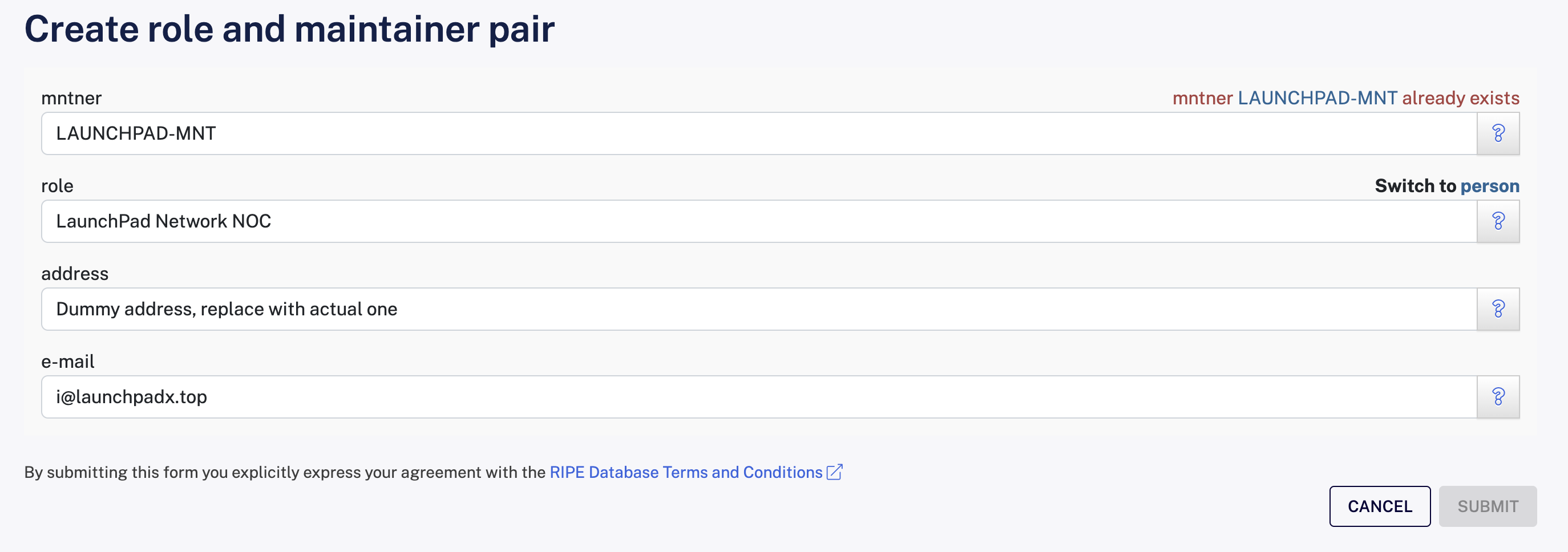
Using my LAUNCHPAD-MNT as an example
After completing, click the SUBMIT button to create both a role and a mntner object simultaneously. You need to note down the primary key (nic-hdl) of the role object, which you will need to provide to your LIR later and will be used in almost all objects.
3. Set the Abuse Notification Email
RIPE NCC will periodically verify the validity of this email; be sure it is genuinely usable.
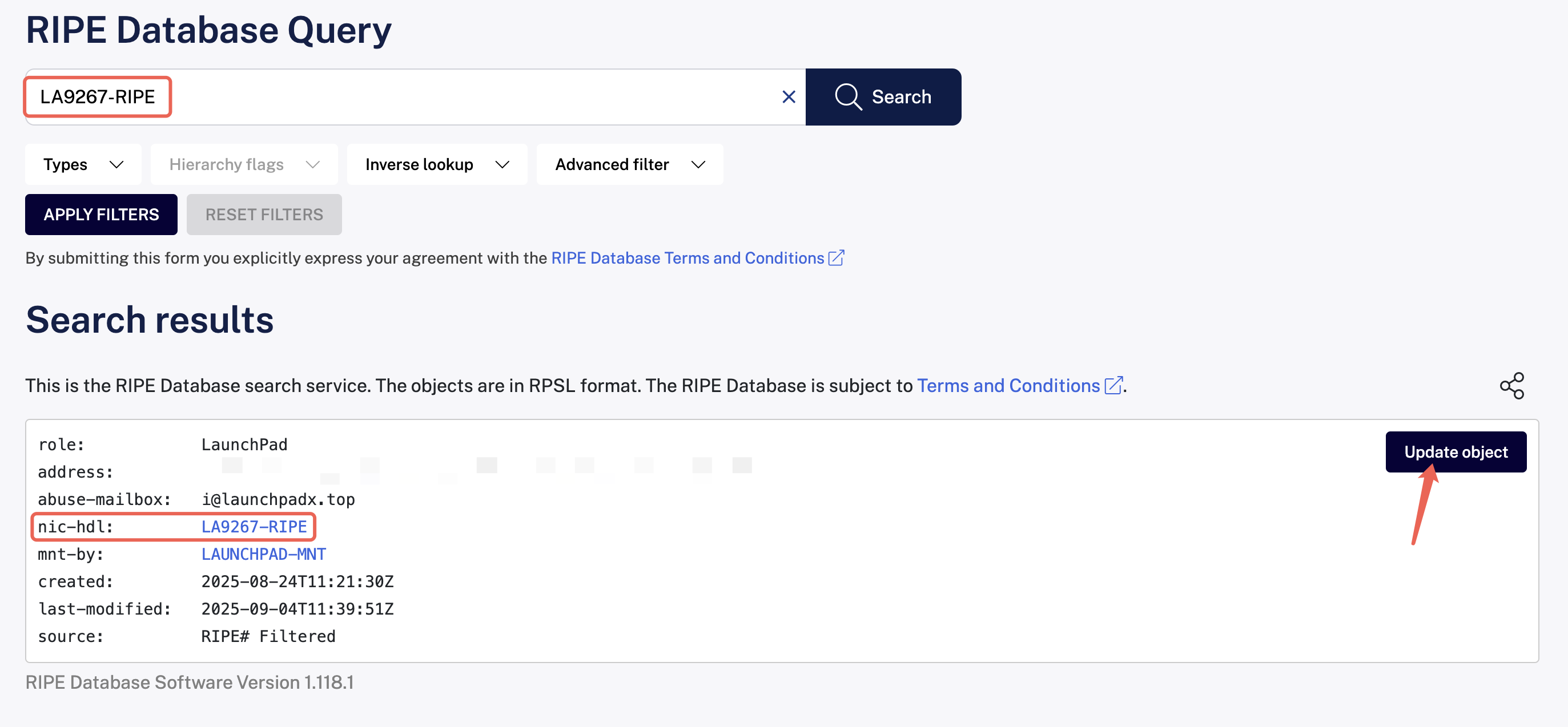
In the search box at the top of RIPE Database Query, enter the primary key of the role object from the previous section and click the search button on the right. Next, click the Update object button at the upper right of the search result to jump to the modification page.
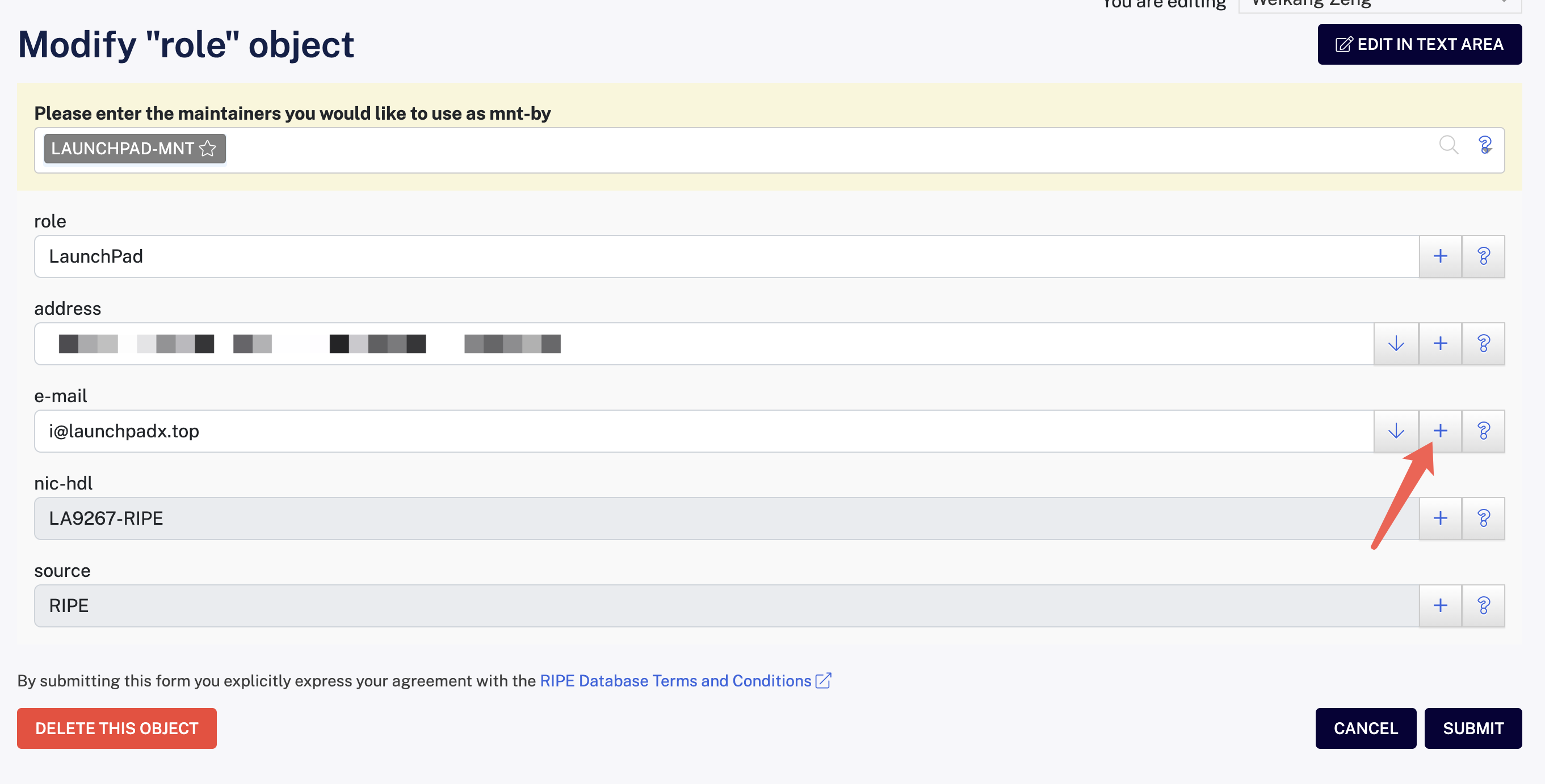
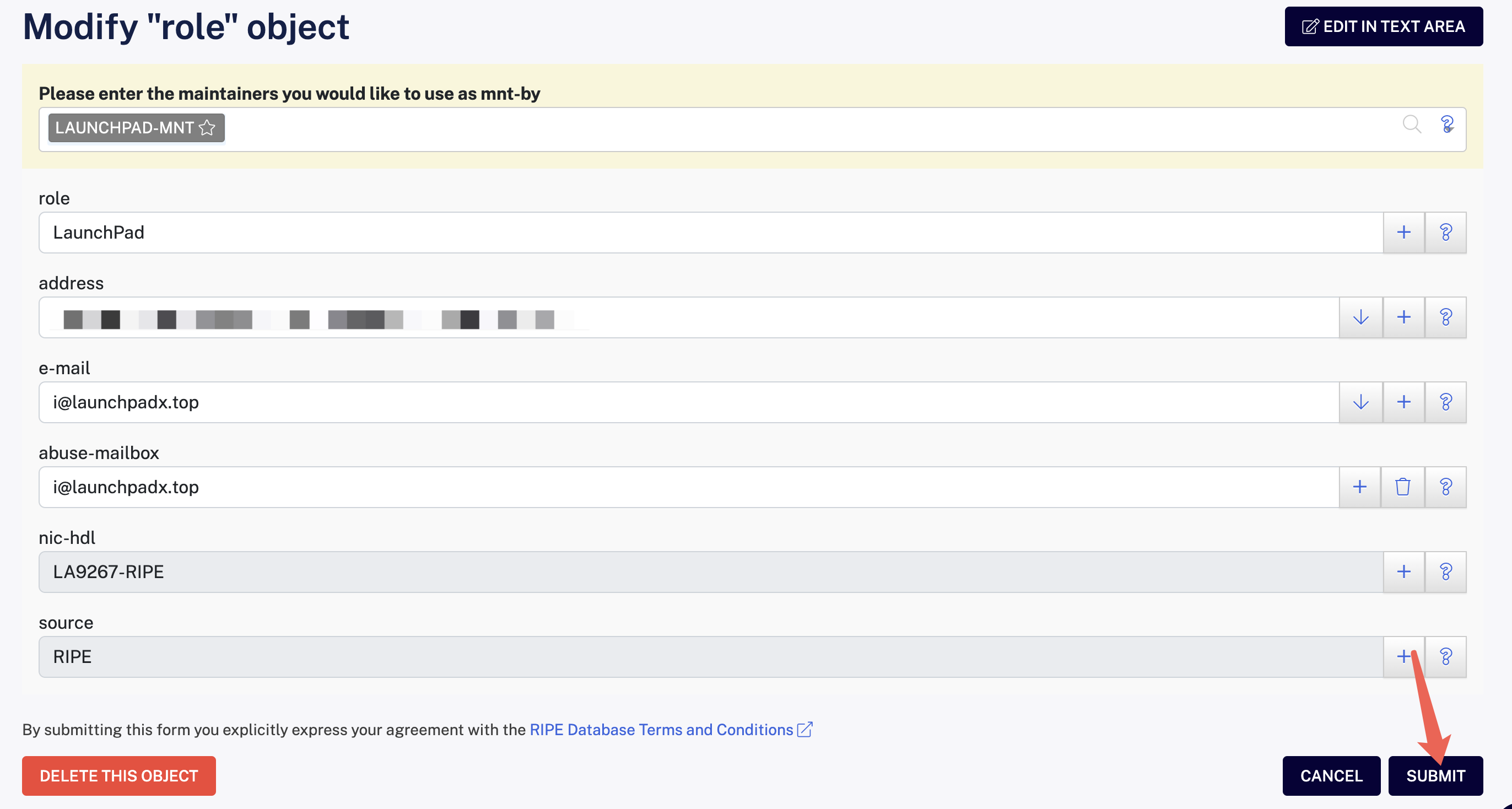
Click the + button to the right of the e-mail field to add the abuse-mailbox attribute to this role object.
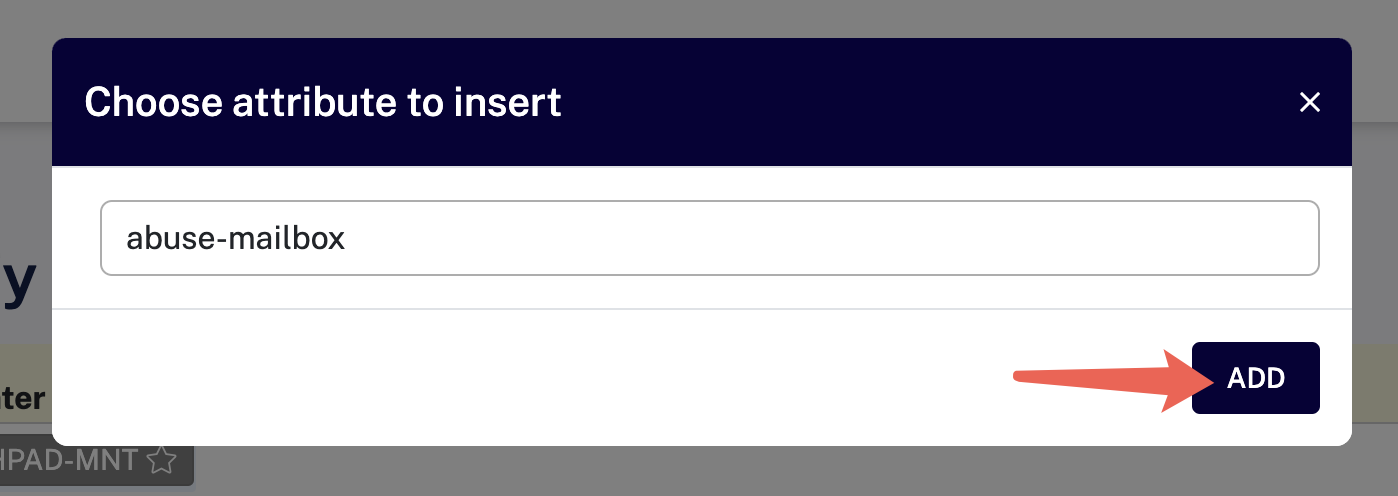
Fill in the abuse notification email in the abuse-mailbox field that appears, then click the SUBMIT button to save.
4. Create an organisation Object
The organisation object is an abstraction of a company, non-profit group, or individual, to which all other resources are related. It is the starting point for managing data in the RIPE Database.
When creating an organisation object via RIPE Database - Create organisation, you need to fill in:
- mnt-by : Who manages it, by default auto-filled with the mntner identifier created earlier
- organisation : The identifier of the organisation object, default filling AUTO-1 will let the system auto-generate an identifier
- org-name: The name of this organisation; you must fill in either the full legal name of the organization or a personal name
- address : The contact address for this organisation; must be either the legal address of the organization or a personal residence address
- e-mail: The email contact address for this organisation
- abuse-c: The abuse notification contact for this organisation, must point to a role object with an abuse-mailbox attribute
- mnt-ref: Who can reference this organisation; the pointed mntner can add objects that reference this organisation, i.e., who allocates resources for this organization. You can ask your LIR for the specific value
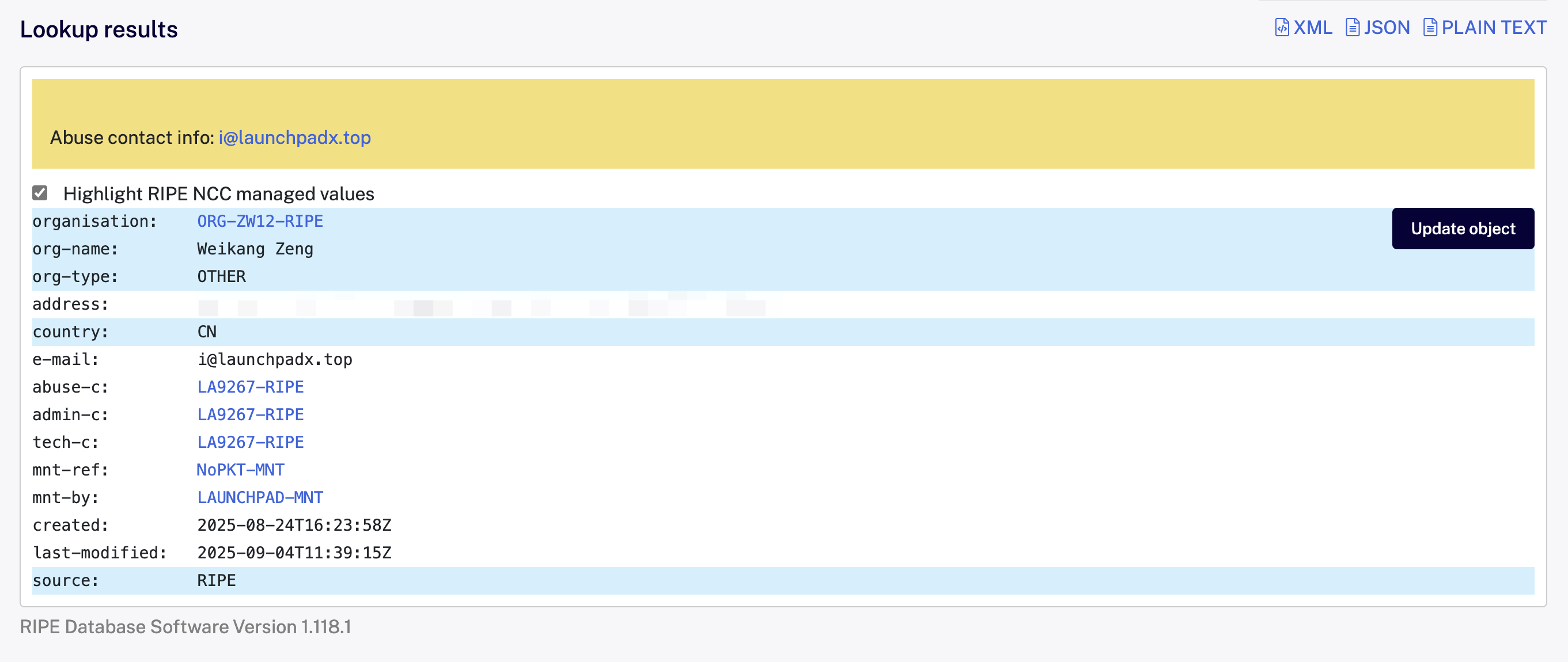
My organisation object, for reference
After filling out, click SUBMIT and note down the returned object identifier, which will be in a format like ORG-XXXX-RIPE.
Ex. What to do if something went wrong earlier?
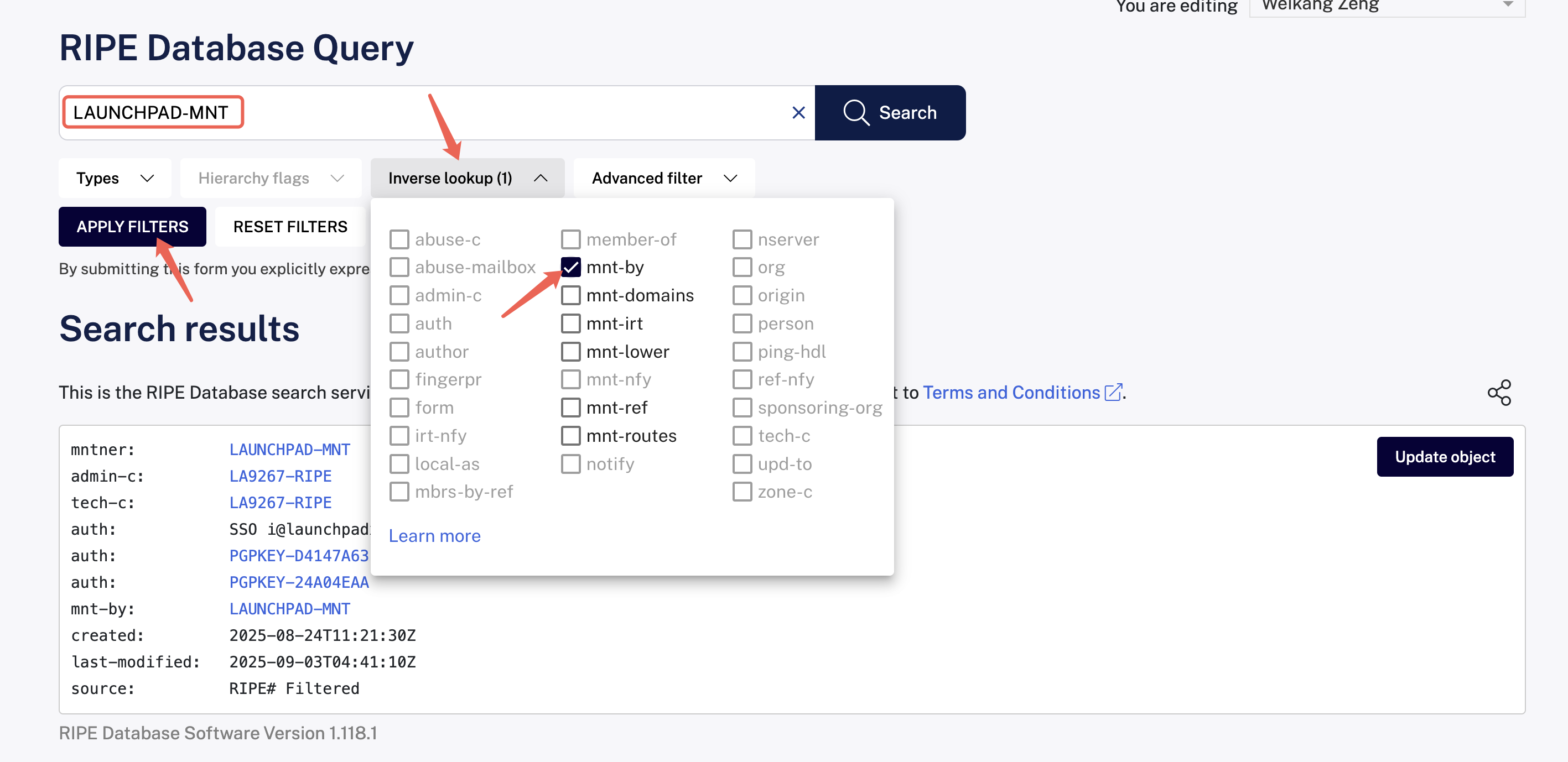
If you discover a mistake in the content above, go to RIPE Database Query and search for the primary key of the object you need to correct. Click the Update object button at the upper right to jump to the modification page, edit as needed, then SUBMIT.
If you don't know the primary key of the object you want to correct, or just want to check, you can use the reverse search feature to query objects managed by your mntner.
Submit Materials to LIR and Pay Fees
You need to provide the following materials to the LIR:
- Certificate of incorporation / Passport (Chinese resident ID card) front and back
- Proof of network activity within the RIPE NCC service region (e.g., a European VPS invoice; additionally, it is recommended to include the data center address and backend screenshots)
- org (Section 4, organisation object identifier)
- admin-c (Section 2, role object primary key)
- tech-c (Section 2, role object primary key)
- abuse-c (Section 2, role object primary key)
- mnt-by (Section 2, mntner object identifier)
Then, according to the LIR's requirements, pay the relevant fees and wait for RIPE NCC's review. If all goes well, within 1-3 business days you'll have your own ASN!